


AI isn’t an add-on; it’s a coworker at every step of the job
An assistant that opens from any page; modules, exams and surveys built in minutes; analyses that interpret reports for you; and smart actions tailored to every screen, all on one platform.
The assistant reads your data with your permissions, returns results as tables or Excel, shows you changes first and applies them only with your approval. ChatGPT and Claude run on the same infrastructure, and the best model for each job is selected automatically.
Request a demo See the assistant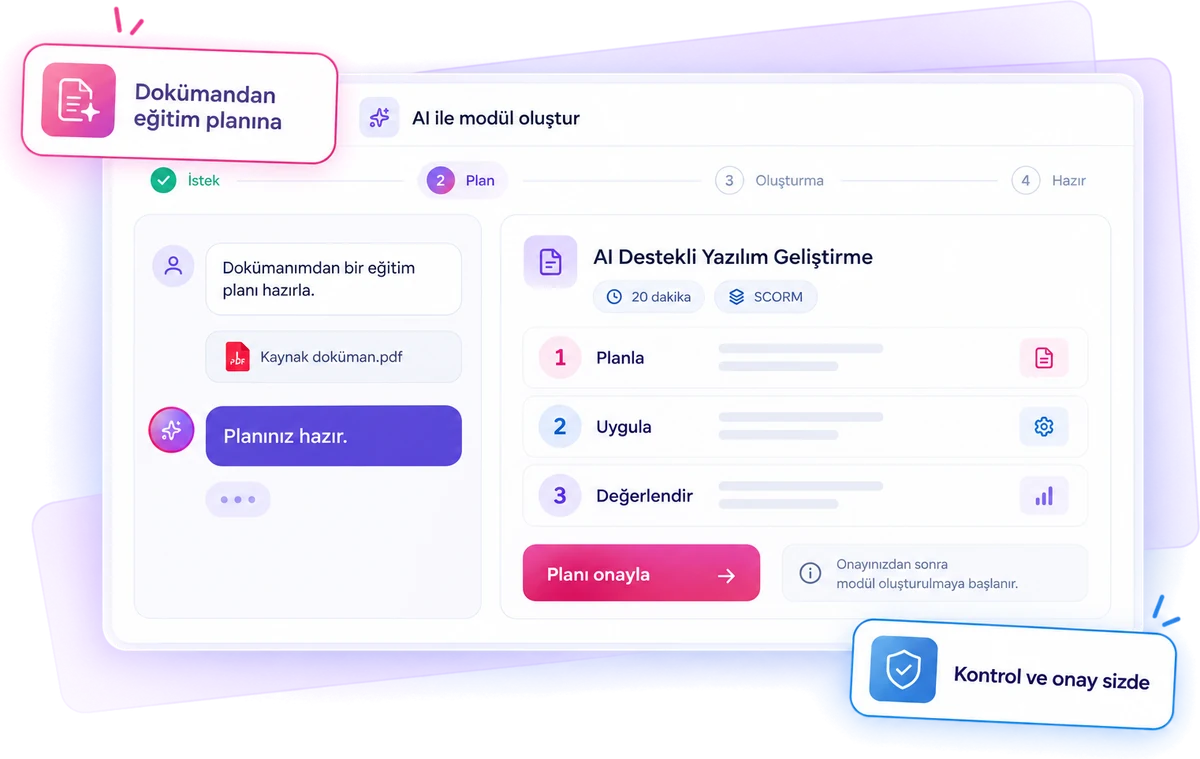
Oriento’s AI in six areas
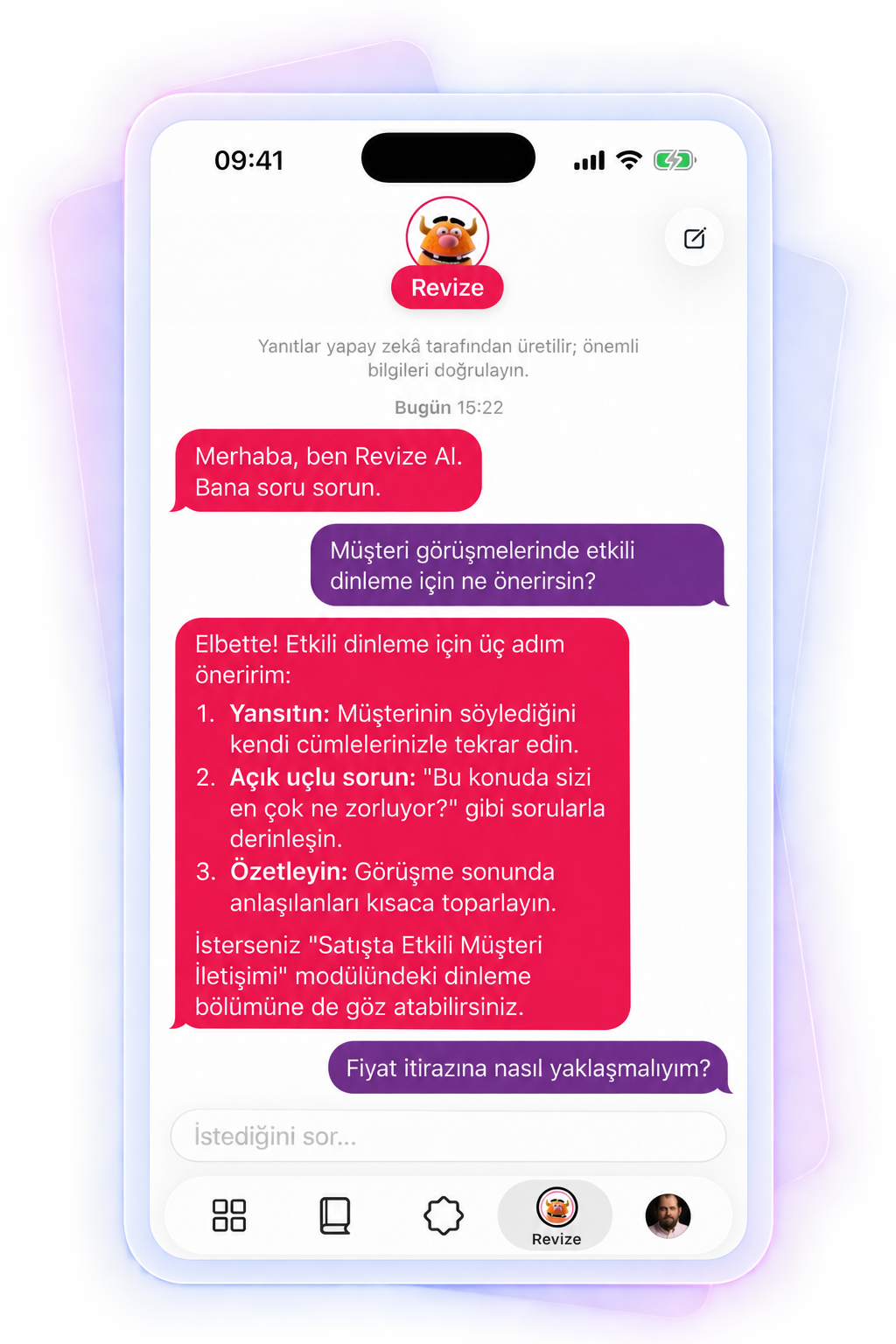
An assistant one shortcut away
Open it from any page with Alt + Space or Ctrl + K. Type your question in your own words or ask out loud; it reads your data, summarizes, returns tables and Excel files, and acts with your approval.
From a topic to a complete module
The plan, content, exams, images and, if requested, a SCORM package are generated together; the module is created inactive so you can edit it before publishing.
A menu tailored to every screen
From exams to certificates and reports to the glossary: AI actions that fit the screen you’re on, one click away.
230+ smart actions
People, modules, assessment, reports, competencies, certificates, events and settings: the assistant’s actions cover the entire platform.
ChatGPT and Claude on one infrastructure
Models from both providers are used from the same screens; the best model for each job is selected automatically, and if one doesn’t respond, the job moves to the other.
Under your organization’s control
Data only within your permissions, personal data only with consent, every change approved and every action logged. ID numbers, IBANs, card details and passwords never go to the AI under any circumstances.
12 people in the Istanbul · Sales group haven’t completed the module. The first three:
| First name | Progress | Last login |
|---|---|---|
| Ayşe K. | %40 | 9 days ago |
| Mert D. | %0 | 21 days ago |
| Selin A. | %65 | 2 days ago |
Illustrative chat; data is sample only.
Ask, and it understands and acts
An assistant that opens from any page with Alt + Space or Ctrl + K and works with your organization’s data. You ask in everyday language; it finds the information it needs on its own.
- Reads reports, modules, participants, and exam and survey results with your permissions.
- Answers in plain text, a table card or an Excel file, and shows locations on a map card for requests with an address.
- Doesn’t guess on ambiguous requests; it shows a clickable selection list (“which Ayşe?”, “which module?”).
- Attach documents, presentations and Excel files and have the assistant work from them.
- Chat history is saved, so you can return to old chats and pick up where you left off.
Approved actions
Actions such as assigning modules, creating groups, adding people or issuing certificates are first shown on a preview card; nothing changes until you say “Approve and apply”. Reversible actions can be undone with one click.
Voice chat
Ask by speaking and get spoken answers; in natural voice mode you can interrupt the assistant and talk as if someone were in front of you. The transcript is saved to chat history.
Fits every role
Admins use it for the whole organization, instructors only for their own modules and participants, and employees for their own modules, certificates and competencies.
Enter a topic, get a suggested plan, approve it, and the module is built end to end
Users don’t need instructional design expertise, a course architecture or to build each item by hand. The core question is: “What do I want to teach, and to whom?”
Describe your need
Describe the course in plain language, and optionally add your own documents as reference.
Shape the plan together
Shape the plan by chatting with AI about the audience, tone, length and sections.
Generate the content
Sections are generated at the same time, in parallel; each learning object is saved separately and tracked live.
Architecture first, then content; you approve
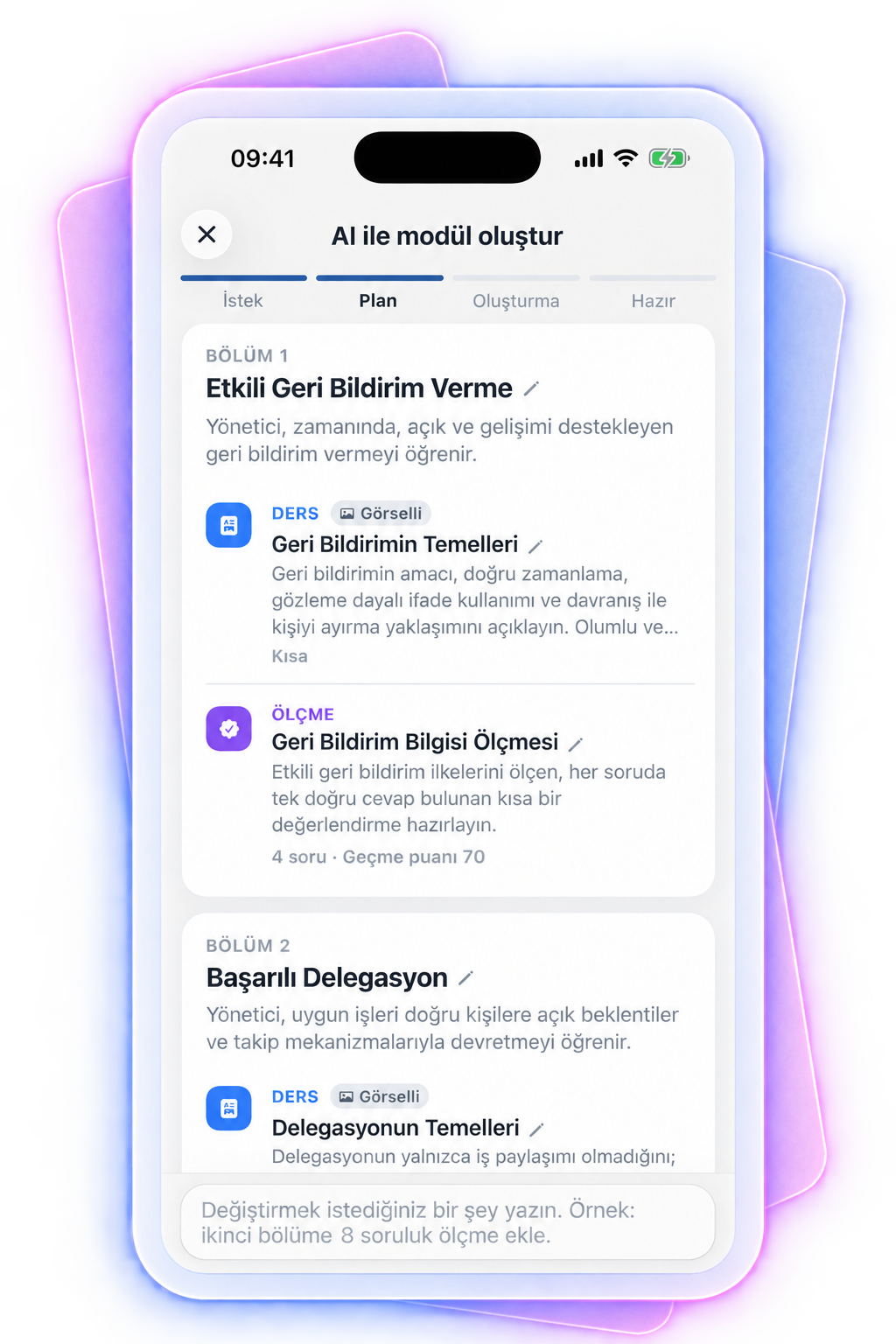
Instead of generating dozens of items right away, AI first answers “How should I structure this course?” For each section it sets the title, goal, topic flow, learning objects, content type, length and assessment approach.
Sample plan for the “Formula 1: More Than Speed” section.
Change the plan by chatting:
No course content is generated until you approve the plan. You see the proposed architecture, change it and do a final check before production starts; editorial control stays with your organization.
From exams to reports, from reports to competencies
Exams and surveys
- A complete exam from a topic or sources; a complete survey from a goal.
- Question studio: generates questions by topic and difficulty and extracts questions from documents.
- Reviews questions, suggests distractors, runs item analysis and recommends exam settings.
- Groups survey answers into themes and writes a manager summary.
Reports and analysis
- Daily briefing: what needs attention today.
- At-risk employees, with reasons, in one list.
- Report commentary: highlights and risks in writing.
- Reports from a sentence, sticking points, employee profile summaries.
Competencies
- A complete competency from a single topic (“Photoshop”), with level definitions, a module and an exam.
- Library suggestions, level definitions, focus period suggestions.
- Heat map commentary, escalation rule drafts, granting competencies.
A menu that fits the screen you’re on
Every screen has its own AI menu. Long jobs run in the background; you can leave the page and get notified when they finish.
People and groups
Create groups from a sentence, suggest modules for a group, clean up departments and titles, review registration requests, organize categories.
Content and communication
A writing assistant in text fields (draft, improve, shorten, change tone, translate), document descriptions, email templates, announcements.
Events, settings and glossary
Bulk events from a calendar, a theme from your logo, login images, certificate text and design checks, agreement drafts, and filling in missing terms and translations.
A bot that learns from your documents and cites its sources
The knowledge-base chatbot learns from your organization’s documents (PDF, Word, PowerPoint, text), answers employees’ questions from these sources and shows where each answer came from. It runs in a closed loop and won’t answer topics you haven’t taught it.
- Train it by uploading documents or pasting text; you can also add and reindex sources through the assistant.
- Customize its name, type, welcome message and bubble colors, or turn it off entirely.
- AI builds FAQs from the questions the bot struggles with and writes the answers.
- See the most asked questions, the answers given and the tokens used in the statistics.
ChatGPT and Claude on one infrastructure; your data under your control
Smart model selection and tokens
- The best model for each job is selected automatically; if a provider doesn’t respond, the job moves to the other.
- If the organization allows it, users choose the model; otherwise a single model can be fixed.
- Every token-consuming action shows the estimated cost first and asks for approval.
- An organization token pool renewed monthly or yearly, with reports on who spent how much on which feature.
Security and privacy
- The assistant accesses only the data you can see.
- Personal data such as email and phone is never sent unless you allow it in that chat.
- National ID numbers, IBANs, card details and passwords never go to the AI under any circumstances.
- Every change needs approval and every action is logged; your admin turns providers and action types on or off.
About Oriento’s AI
What data can the assistant access?
Only the data your permissions let you see. Admins can ask about the whole organization, instructors only about their own modules and participants, and employees only about their own records.
Does the AI apply changes on its own?
No. Every action is first shown on a preview card; nothing changes until you say “Approve and apply”. In module generation, too, no content is created until you approve the plan.
Is personal data sent to AI providers?
Details such as email and phone are sent only if you allow it in that chat. ID numbers, IBANs, card details and passwords are never sent under any circumstances.
Which models are used, and how do we control cost?
ChatGPT and Claude run on the same infrastructure; the best model is selected automatically, or the organization fixes a single model. The estimated cost is shown before every action, and the organization has a renewable token pool and detailed usage reports.
Can we use our own documents?
Yes. Use your Word, PDF, PowerPoint and text files as references in module generation, as attachments in the assistant and in the chatbot’s knowledge base.
Let’s try the assistant with your data
Tell us about a course you want to build or a report you’re curious about, and let’s see together how Oriento’s AI works.
- An assistant on every page
- No changes without your approval
- ChatGPT and Claude on one infrastructure
We’ve received your request
We’ll get back to you the same day. If it’s urgent, email us at info@digitallica.com.tr.